Wednesday, October 31, 2012

Star Citizen - Space Sim MMORPG on Kickstarter!


*** Update: ***
 GLXP posted about it on FB!

 https://www.facebook.com/googlelunarxprize/posts/284421335009192
***

Kickstarter: http://www.kickstarter.com/projects/cig/star-citizen
Website: http://www.robertsspaceindustries.com/star-citizen/

Donate at kickstarter, because funds at kickstarter help stretch goals both at kickstarter AND the website!! =)
The whole project is funded, with 19 days to go and rapid increasing in funding.

I've always wanted an MMORPG Space Sim with FPS elements. Sort of like Precursors with multiplayer and a persistent player-affected evolving universe. It would be up there with my favourite games of all time (Tribes 1- Annihilation mod, Team Fortress 2). The Freelancer, X series, Vega Strike and Wing Commander (this made by the same company) have all been great space sims, but I think lacked planetary/out of cockpit exploration/gameplay. 

http://www.kickstarter.com/projects/cig/star-citizen/posts/332531 
This update post answered all my questions lol. 
While they said has "first person shooter" elements like running around on the ship, the demo vid only has 3rd person running around on the flight deck. Planetary exploration is probably what will tip me to buying it, but they're not promising it T_T
I liked Precursors as it was as much a normal FPS/RPG on planets and ships/stations as it was space ship pew pews complete with space anomalies, upgrades, the works. 
 
If they do put planetary walk around in, it'll have a leg up on http://www.infinity-universe.com/Infinity/index.php?option=com_content&task=view&id=14&Itemid=35 [oo Joomla] which allows you to land on planets but not walk on them. 

And at Nov 2014 release date, it looks like it may arrive faster than Infinity. Especially if I get to play the Alpha/Betas.
=P

I will most likely back this, it's sooooo tempting!! Just backed this as the last $30 digital download pledge on Kickstarter xD.
Making it the first game related project I backed on Kickstarter, passing by Ooya, Planetary Annihilation, That adventure game,  Homestuck, FTL, etc. Been wanting an MMORPG Space Sim for aaages (Been following that Infinity project for more than a few years now xD) 

Only downsides are: no Linux support on CryEngine3 (although Android is supported), is possible there will be pay 2 not grind instead of subscription, which would be horrible (though you need to pay a once off fee, which hopefully should prevent that, and if the devs are as community oriented as this game relies on, then it would be in their best interests not to payORgrind). They're also allowing community content like TF2 hats and levels =P


Monday, October 29, 2012

Steam closed beta for Linux is here! (+ other news)

You may have read http://vcpd12.blogspot.com.au/2012/10/tf2-beta-on-steam-for-linux.html
Which has pretty cool infos and links =)

If you were lurking http://blogs.valvesoftware.com/linux/ like me, you may have missed this important link:
http://www.valvesoftware.com/linuxsurvey.php
It was open since 27th of October! Enjoy!

You may also want to take a look at:
http://steamcommunity.com/app/221410


In other project news:
Ubunchu ch.8 is more than half way done =)

Speaking of manga/anime, check this out:
http://www.animenewsnetwork.com.au/news/2012-10-08/astronaut-successfully-dubs-space-brothers-anime-from-space
First voice acting done in space! Woot! =D

Friday, October 26, 2012

Parrallella Epiphany Kickstarter by Adapteva

$100 credit card sized Parallella combines FPGA, ARM, & DSPs. 18CPUs @800MHz with 5Watts! o New vid, so tempting! xD http://kck.st/UGQjG3

I wouldn't really know what to do with it that I wouldn't be able to do on a gumstix/raspberry pi ... apart from BOINC and testing 2048-bit RSA or AES cracking solving chess.

Here's an excerpt cos I'm too lazy to iframe, just click the kickstarter link above for full updates, videos and graphics. The project still needs $185k/$750k in 48 hours so if you want to see this project go ahead, support!

The following list shows the major components planned for the Parallella computer:
  • Zynq-7010 Dual-core ARM A9 CPU
  • Epiphany Multicore Accelerator (16 or 64 cores)
  • 1GB RAM 
  • MicroSD Card
  • USB 2.0 (two) 
  • Two general purpose expansion connectors
  • Ethernet 10/100/1000
  • HDMI connection
  • Ships with Ubuntu OS
  • Ships with free open source Epiphany development tools that include C compiler, multicore debugger, Eclipse IDE, OpenCL SDK/compiler, and run time libraries. 
  • Dimensions are 3.4'' x 2.1''  
Wow, it ships with Ubuntu ... no more annoying qemu images (from my experiences with the gumstix) I guess =P

Wednesday, October 24, 2012

TF2 beta on Steam for Linux!

Yay! My 2nd favourite game of all time (Tribes 1 being my most favourite) is here!
http://marlamin.com/cdr/search.php?s=linux&searchby=os

The above links to the data streamed from Steam CDR (read the about page for more details).
There are at least 38 games listed for Linux, including a lot of games from the Humble Bundles.
It's great to know that alongside TF2, there's Killing Floor =)

Can't wait to get my hands on the client (set to run on Ubuntu and closed beta release this month) and test their >200fps L4D2
http://blogs.valvesoftware.com/linux/

There's also some good news occasionally updated here:
http://steamforlinux.com/

Tuesday, October 23, 2012

Google Chrome and them devs =P

http://www.google.com/chrome/intl/en/w00t.html in an iframe:

Lol. Deving for google MUST be fun =P

Found this while wanted a fast browser for Firefox-not-compatible things and fed up with Chromium as it often crashes now.

Obligatory Linux Fix #?25 - KDE PulseAudio

 saw this:


$ start-pulseaudio-kde
fixed it. yep.

Thanks
http://www.freedesktop.org/wiki/Software/PulseAudio/Desktops/KDE
=D

Monday, October 8, 2012

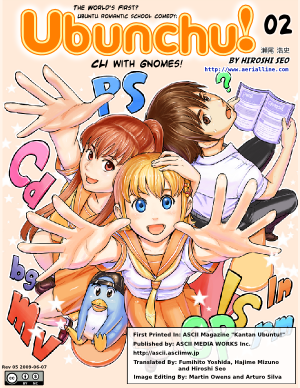
Ubunchu!~

WOW (lolwut). Just found this on linuxmint's Tumblr. ( http://linuxmint.tumblr.com/post/33029338128/episode-12-of-ubunchu-a-manga-about-ubuntu )
There's a manga about Ubuntu?! Seriously?!

https://seotch.wordpress.com/ubunchu/
http://www.aerialline.com/comics/ubunchu (japanese page)
http://divajutta.com/doctormo/ubunchu/c.html (translation project page!)


Another great CC project =) [It's CC BY-NC]
Basically Japanese manga on a computer club in highschool that is discovering Ubuntu.
First made in 2009 so it would be the 9.04-9.10 releases of Ubuntu; I personally started using it somewhere in the 7-8.x range. This was before the polished product 10.04 was though, and none of the stupid Unity stuff from 11.04 onwards (KDE/xfce ftw), so it can't comment on those in the first chapters. However, the series is ongoing, hence the post from mint.

The art's alright (but I seriously don't care too much about the art in my manga/anime - look at Initial D, I liked it a lot but all the faces looked ugly to me =P).
The plot and characterisation doesn't have the depth and force of a regular shonen (ONE PIECE!!! =D) but you do get the regular Japanese manga stuff in there (love the stereotypes, melodrama etc.), and it's interesting to see how a manga would work with the whole topic based on a linux distro. lol.

Saturday, September 22, 2012

Initial thoughts on JellyTime R7 (CM)

Check my previous post for more regarding ROMs and Android for the HTC Desire HD. 

Just notes to myself mainly; thoughts on JT R7 (CM) by randomblame from having upgraded from IceColdSandwich 8.4 by LordClockaN

TL;DR - it's REALLY smooth that's for sure. phone feels a lot less lagy. (and more stable than ICS =o)
battery life is pretty much a little bit worse probably by 5-10% but i just came from AOKP and these are pretty early releases, will switch to AOKP soon.
Pretty much everything works fine atm, but video camera .
defs feels like a 4.1 instead of 5.0

Video recorder broken
(even though changelog says 720p OK) -gallery stopped (vid cam illusion works 480p), stock camera app greatly improved, touch focus.
recording audio unbroken. No mic mute problem when speaker turned on in call. 

Screen on when turned off with light bands - saw this once, fixed by turning screen on then off. 
 
Updating Google Play apps not jaggered-frozen/slow anymore, the Play Store app is generally faster/smoother.
A lot less lagyness, not near as frequent force close messages
(prob occured when nand recovered back into ICS8.4).

Toggles work flawlessly, however CM has no powersaver option. Must manually turn off stuff before turning off screen.
Battery life is a bit worse, 3-7mA idle vs. ~10(-80)mA. Battery overall probably lasts 2 hours less, although music with screen off is still ~75mA. Probably a combination of no power saver in CM and project butter pumping my CPU to the higher freqs more often.

CM does indeed have less options than AOKP and lockscreen gestures doesn't work/no option for them, only 5-slider lockscreen. Custom Apps/Shortcuts don't work atm, I think this was in the changelog. 

Apollo music app - lockscreen no artist, widget - only white, has black theme. Luckily still uses DSP Manager. Change to google Music - the one that comes with AOKP. 
Switch to AOKP ASAP.

Revert Exec Assist. lockscreen to non-ad. Possible future android app dev project - lockscreen/widget.
FB app running faster, could be FB devs or FB-JB compatibility. 


USB storage connection with computer breaks regularly, or could be this new cable I'm using, will test with original cable soon. 

Monday, September 17, 2012

Android ROMs on the HTC Desire HD & Flashing Checklist

Most of your DHD ROMs can be found right here:
http://forum.xda-developers.com/forumdisplay.php?f=765

Glossary/Links:
CM - http://www.cyanogenmod.com/
AOKP - http://aokp.co/index.php/about
AOSP - http://source.android.com/ (Hurray for FOSS!!)
ROM, Flashing, radios, etc. - Google and xda site search are your friends. (i.e. RTFriendlyM)

Here's a list of the ROMs I've used previously:

- Stock 2.3 Gingerbread with Sense. Yuk. (My opinion of manufacturer Android distributions/overlays - being launcher, widgets, lockscreen - is that they love to make them hard to use and ugly.
- Android Revolution HD (by mike), pretty good Android 2.3 ROM
- Virtuous Quattro, didn't really like it

Current ROM: 
- Ice Cold Sandwich by LorD ClockaN
It's been great, got it before the Camera even took photos without cutting off bits. Then came the 480p video recording mod and my phone was complete =) I mainly upgraded to Android 4.0 ICS because I wanted to be able to access my university's wpa2 wifi network. When I tried moving back to ARHD or any 2.3 ROM I just didn't like all the missing features.
It's more or less stable (with the odd reboot, which could be triggered by certain app versions misbehaving), with great battery life (lasts the day) and AOKP's power saver works well to achieve that. Camera's still no where near as good as the Sense camera (only thing good about sense) but it does come pretty close to the AOSP one.
From the AOKP ROM Control, I use an octo-lockscreen, toggles, custom auto backlight levels, custom clock battery and signal icons/text colours etc. =D
Nova launcher is my preferred launcher, especially now that it has backup and restore function. Good for regular ROM flashing, speaking of which, I'll have a little checklist at the end of the guide that I use to make sure I don't brick my device (check those checksum hashes of the ROM/radios people).
Apparently BFS kernel and smartassV2 CPU scheduler (default is ondemand) yield freeze/boot-free results and better CPU respectively.

ROM I'm thinking of using:
JellyTime, since it's basically the only ROM based on AOKP which you can find updated regularly on the xda forums. ATM I'm thinking of using the CM based build just because it seems to be updated a bit more and possibly more polished. (It's AOKP's fault for being a bit slow on the ball for JellyBean.) I am however, an AOKP fan as it just seems to have all the settings I want so I'll be moving to AOKP soon.
Here's the links on xda:
AOKP-based JellyTime by randomblame
CM10-based JellyTime by randomblame


 My ROM flashing checklist (useful if you flash constantly and need to remember stuff so as not to screw up or brick your device).


Pre-Flashing Checklist
SMS log      - SMS BackUp Restore
Call log     - Call log BU&R
Whatsapp etc.- Backup Convos In-App & Account with Titanium Backup
Home Screen  - Nova Settings/Layout Backup
Apps         - Titanium Backup (data),
             - Astro (APK for Easy Installer),
             - APK Batch INstaller [PC]
ROM settings - AOKP Backup settings
(Rebackup Data for SMS/Call/Home Apps)

Nandbackup  !!
--------------------------------------------
Flashing:

Boot Recovery (Nandbackup reminder)
Full wipe (incl. Wipe cache + dalvik cache)
Install/Flash ROM
Flash Gapps if needed

Boot into ROM

(Flash kernel - BFS if needed)
--------------------------------------------
Post-flash:

Reinstall: Easy Installer/Astro/Titanium Backup
Restore all apps (Easy Installer/APK Batch Installer[PC])
Restore all app-data (Titanium Backup/APK Batch Installer[PC])
Restore SMS
Restore Call log
Restore Whatsapp, Viber, Line etc.
Restore Home Screen

Redo ROM settings. - AOKP Backup/Restore


Optional custom DPI:
Restore DPI - 210/220
Flash market/ install GPlay apk (Phonesky, Google Services Framework)
Clear Market Data
Redo DPI method


Saturday, September 15, 2012